
#Network issues
How to use it in mainland China?
Socks5 does not support users in mainland China, nor does it provide circumvention functions. Please purchase and use it in an overseas network environment.
I don’t have an overseas network environment. Can you help me set up an overseas network environment?
Socks5 does not assist any customers in setting up overseas environments.
Display connection failure/detection failure
Socks5 proxy needs to be used in an overseas environment. If you connect under the network in mainland China, it is likely that "connection failure" will occur, and you need to use it in an overseas environment. If you are already in an overseas environment and still display "connection failure", it may be because the tool you use the proxy still uses the line in mainland China. You can first check the local network environment and contact official customer service for processing.
How to check local network?
You can open cmd or terminal and enter curl ip-api.com to view the current IP address. If the country is displayed as "cn", it means that your current network status is mainland China. Socks5 only supports users in areas where the country is displayed as non-"cn".
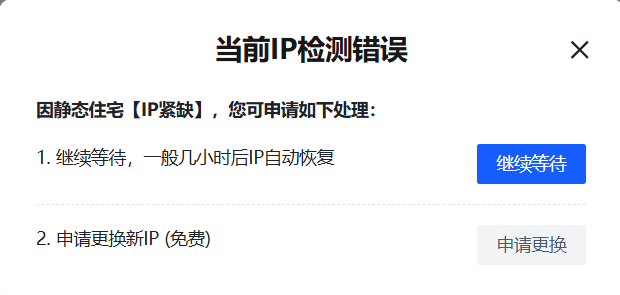
Static IP detection error?
- It is recommended to wait for a period of time. Generally, it will recover automatically. You can contact official customer service for confirmation.
- If it cannot be restored, you can submit a replacement application according to the page guidance after checking the static IP error.
Why are the IPs extracted by the API the same IP?
[What the API extracts are transit IPs, not real IPs]. You can use it directly and it will automatically link to the real IP behind it.
When adding a whitelist, it prompts "IP already exists"?
Please check whether you have multiple accounts. [One IP can only belong to one account whitelist] Whether your whitelist is in other accounts. [Log in to the original account to delete the whitelist and re-add it to the new account].